
This guide walks through a reliable, always-on rooftop Meshtastic router node designed with amateur-radio best practices: clean RF, proper grounding, conservative power, and serviceability. The result is a backbone-quality node suitable for neighborhood meshes, EMCOMM augmentation, or permanent coverage extension.
Scope: U.S. 902–928 MHz ISM operation, router role, elevated outdoor installation.
Bill of Materials (BOM)
Core Electronics
- LoRa board: ESP32 + SX1262/SX1276 (T-Beam, Heltec, or RAK WisBlock)
- Power (choose one):
- 5–12 V DC feed with buck regulator to 5 V
- Solar panel (10–20 W), charge controller, LiFePO₄ battery (6–12 Ah)
- Antenna: 5–8 dBi omnidirectional (900 MHz)
- Feedline: LMR-240 (short runs) or LMR-400 (preferred)
- Lightning protection: DC-grounded lightning arrestor (900 MHz rated)
Mechanical & Weatherproofing
- IP65+ enclosure (polycarbonate preferred)
- Bulkhead N-type or SMA feed-through
- Cable glands (UV-rated)
- Mast clamps / standoff mount
- Grounding hardware (bonding strap, clamps)
Tools & Consumables
- Ferrite chokes (snap-on)
- Heat-shrink, dielectric grease
- Stainless hardware
- Multimeter
Step 1 — Choose the Site (Coverage First)
Objective: Maximize line-of-sight and Fresnel clearance.
- Select the highest practical mounting point with clear horizon.
- Avoid shadowing from HVAC, parapets, or metal railings.
- Plan a short coax run and a straight grounding path.
Rule of thumb: Height beats power. A 100 mW node at 9–12 m AGL routinely outperforms higher power at ground level.
Step 2 — Antenna & Mast Assembly


- Mount the mast or standoff securely to structural members.
- Install the antenna above nearby metal (≥ 1 λ preferred).
- Insert the lightning arrestor at the building entry.
- Bond mast and arrestor to the same ground used for other radio systems.
Notes
- Prefer N-type outdoors for durability.
- Add a drip loop before entry.
Step 3 — Enclosure Prep (RF Hygiene)
- Drill for:
- Antenna bulkhead
- Power entry
- Pressure equalization vent (optional but recommended)
- Mount the LoRa board on non-conductive standoffs.
- Keep RF and power physically separated inside the box.
- Add snap-on ferrites to power leads at the enclosure wall.
Step 4 — Power System Wiring
Option A: DC-Fed (Simplest)
- Feed 12 V from shack or rooftop supply.
- Buck to a stable 5 V at the board.
- Include inline fuse (0.5–1 A).
Option B: Solar (Autonomous)
- Panel → charge controller → LiFePO₄ battery.
- Set conservative low-voltage cut-off.
- Budget for 72+ hours autonomy at your duty cycle.
Target draw: 40–80 mA average (router profile, modest telemetry).
Step 5 — Firmware Flash & Initial Setup

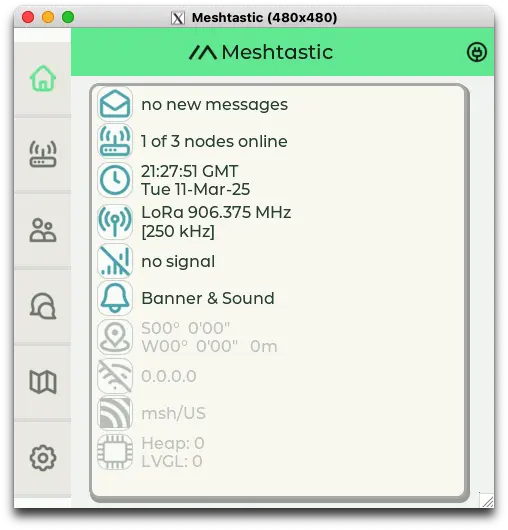

- Flash current Meshtastic firmware from Meshtastic.
- Connect via USB or Bluetooth.
- Set:
- Role: Router (or Repeater if minimizing chatter)
- Region: US (915 MHz)
- Channel: Private or shared (per your mesh plan)
- TX Power: Conservative (start low)
- Telemetry: Reduce intervals for backbone nodes
- Disable unused sensors/features.
Step 6 — Bench Test (Before Roof Time)
- Verify RSSI/SNR to a handheld node.
- Confirm no resets under transmit.
- Check current draw under load.
- Heat-soak test (sealed enclosure) for 30–60 minutes.
Step 7 — Rooftop Installation
- Mount enclosure below antenna (short jumper).
- Secure all cables with UV-rated ties.
- Apply dielectric grease to connectors.
- Final torque on mast hardware.
- Photograph installation for documentation.
Step 8 — On-Air Validation
- Walk-test with a mobile node at increasing distances.
- Observe hop count, RSSI, and latency.
- Adjust antenna height or orientation if needed.
- Log node uptime for 7–14 days.
Step 9 — Ongoing Optimization
- Reduce telemetry to minimize airtime.
- Periodically update firmware (planned maintenance).
- Inspect annually: seals, connectors, grounding.
Best-Practice Parameters (Starting Point)
| Setting | Recommendation |
|---|---|
| TX Power | Lowest reliable for your terrain |
| Bandwidth | Narrow where legal/appropriate |
| Telemetry | ≥ 15–30 min |
| Position | Fixed, precise |
| Encryption | Enabled (ISM-appropriate) |
Regulatory & Ethical Notes (Ham Context)
- Operate strictly in ISM bands with Meshtastic features (encryption).
- Do not bridge or retransmit to amateur bands.
- Clearly label enclosure: “ISM / Meshtastic”.
- Align tower grounding and safety practices with amateur standards promoted by organizations such as ARRL.